Showing posts with label Electronics. Show all posts

Thursday, May 01, 2014

Upgrading an OLD System with a NEW SSDrive

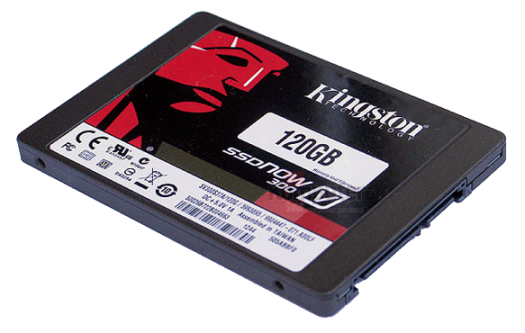
A few days ago I purchased my first SSDrive, that drive was delivered yesterday morning and chosen was the 120GB Kingston SSDNow V300. It is a solid state Hard Disk Drive replacement as my old drive was showing its age, much like me. According to the marketing material SSDNow V300's leading feature promises "faster data throughput." Hey, who am I to disagree indeed SSDNow certainly does deliver on that promise. Following is my impression of the new hardware, for what it's worth, a User-review.

120GB Kingston SSDNow V300 ~ Solid State Hard Drive - from Kingston's product page

The KIT contained all the necessary connections, a USB External Drive Enclosure to help clone a notebook and came bundled with a lite version of Acronis True Image HD (video) cloning software on bootable CD. Thus resizing the new drives partitions, making it bootable then copying the data off my old drive was done automatically, resulting setup was easy as pie. I was expecting a more involved setup procedure but to my surprise, I was up and running in less than an hour. For the advanced or power users, options for an SSD customization and configuration are available. Although a number of functions such as incremental backups were disabled in the "lite" version I soon discovered the software's limitations was never an issue.


For desktops and notebooks, Revive older systems ~ from Kingston's product page
 
However, all was not perfect in the Happy Land of w00d. According to many reviewers, the drives tested with somewhat of an average speed although selling for a good or a better than average price. I paid $99CAD before taxes and shipping were added. Apparently, all V300s were optimized for price over speed and were given a lower than average MTBF therefore, I think compromises should and can be expected.

Additionally, Kingston and their V300s managed to draw a little controversy when they quietly switched to slower NAND (memory) after many review sites had given the early drives a number of favorable reviews. This news came to light when early purchasers were reporting (via the forums) lower performance than reported by the reviewers. For the details on this story, "Update to Kingston SSDNow V300: A Switch to Slower Micron NAND".

   
My Toaster has Never Been Faster


ZOTAC Geforce GTX 760
ZOTAC Geforce GTX 760 Review
With the 120GB V300 being my first SSDrive and given a recent Graphics Card (ZOTAC Geforce GTX 760 review) or GPU upgrade my 'Toaster' has never been faster. They were not kidding when they say "an SSDrive upgrade is the best bang for your buck".

My old hard disk served me well over the years although it was long overdue for replacement. The drive was a 10-year-old 35Gb IDE HDD which ironically was installed because two modern at the time 100GB SATA drives prematurely and unceremoniously gave up their lives within a few weeks of purchase. Therefore with my new SSDrive not only did I get a boost in data throughput but I also gained additional storage with the peace of mind that only comes with brand new hardware.

When talking about the old drive I think I should mention the difference in noise levels between the two drives. Obviously, the new V300 produces absolutely zero noise whereas my old 35Gb is a little screamer. In the defense of old boy it ran flawlessly for many years and is still running as a second drive but it is showing its age with excessive noise, it's loud!

Would I Recommend Kingston's SSDNow V300? 

In my opinion, the prices of SSDrives are starting to look very attractive therefore the time was right for me to buy. With that said as far as the V300s are concerned if one is a power user and if it is raw power and speed one needs (say for gaming or video editing) then I would look at buying something faster. Again, if cost or low cost is your priority then given the low prices of the V300s I think would make them a very good choice for anyone who is building a low budget system. 

Yes, I am more than happy with my choice.

In closing the gains I saw were indeed impressive if only because my Toaster was so damn-darned-old-and-slow any upgrade that could guarantee an increase in system speed would be readily apparent. Nevertheless, the "best bang for my buck" for a system speed boost I hit on the top two with the new SSDrive and faster Graphics Card! Next on my hit-list would be a new motherboard, improved memory with a blazingly-fast-kick-arse CPU ...


Kingston Technology ~ home
   
SSD vs HDD: Must be taken with the proverbial "grain of salt" ... of course actual mileage will vary.


FYI:
Related: 


Monday, December 10, 2012

LSD-NiMH Rechargeable Batteries

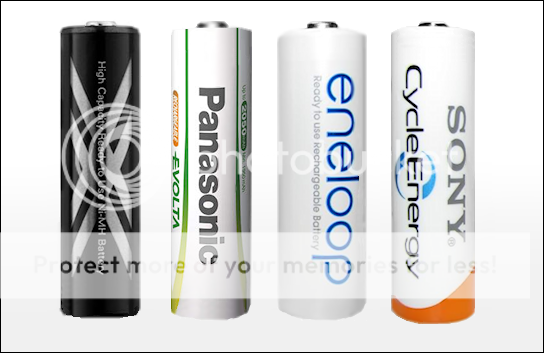
Low Self Discharge (LSD) are an improved type of NiMH rechargeable battery introduced in 2005 and are the only type of battery I will use. Here's why, given the self discharge rate of conventional NiMH Batteries (let's call them old tech) being unacceptable I've found the following brands will meet my needs. Therefor needing batteries that are ready to go at a moments notice I found on average LSDs will have a longer shelf life as they will retain most of their stored capacity by year end giving approximately 1500 re-charge cycles or more. The 'eneloop' brand are claimed to hold their charge for 5 years with 1,800 cycles. LSD rechargables are also available in Triple-A (AAA) sizes.

According to a battery tutorial from photo tuts+ "Conventional NiMH batteries at the approximate capacity loss of 10% after the first 24hrs and 1% per day after will loose just over ½ of their capacity by month's end." This is why Conventional NiMH rechargeable batteries are unsuitable for powering clocks, TV remotes or any device where it's batteries are expected to last a long time. Conventional (old tech) NiMH rechargeable batteries simply self-drain too fast.

Quote: Low Self Discharge (Wikipedia) NiMH are "a new type of nickel–metal hydride cell (the low self-discharge nickel-metal hydride battery, LSD NiMH) was introduced in 2005 that reduces self-discharge and therefore lengthens shelf life. By using an improved electrode separator and improved positive electrode, manufacturers claim the cells retain 70% to 85% of their capacity after one year when stored at 20 °C (68 °F). These cells are marketed as "hybrid", "ready-to-use" or "pre-charged" rechargeables. Standard NiMH batteries may lose half their charge in the same time period. Retention of charge depends a lot on the battery's impedance or internal resistance (the lower the better), and on the size of the battery as well as the mAh rating. Besides the longer shelf life, they are otherwise similar to traditional NiMH batteries of equivalent capacity and can be charged in typical NiMH chargers"  

Longer storage with LSD rechargables


Low Self Discharge (LSD) rechargeable batteries
    
Four popular Low Self Discharge (LSD) Rechargeable Batteries
... in order of appearance 


SONY CycleEnergy: AA, NiMH, 2000 mAh
Reference

Tuesday, August 14, 2012

DIY: Power Supply

I modified the following Power Supply Unit (PSU) to use with a 12vdc RC Battery Charger. If you have an old computer (PC) PSU collecting dust or your thinking of tossing one into the trash then consider this alternative. Rather than spending an arm and a leg for what they want for those specifically made for the 12vdc RC Battery Chargers this modification might be the sweet deal your looking for, it certainly was for myself.

A modified PSU as such would also make a pretty good Electronics Lab or Bench Power Supply. To illustrate, I also use the +5vdc output to power my RC Helicopters RX, Servos and GYRO to effectively bypass powering the motor during it's mechanical setup. This eliminates the risk of the heli accidentally powering up the motor during the setup procedure. Normally we would mechanically or electrically disengage the motor or use a separate battery pack to bypass the ESC when setting up our helicopters. And occasionally I have used this PSU to power many of my smaller electronic projects but these are only a few examples as to possible uses. Not to be condescending but the only limit would be our imagination.

Gotcha: The best PSU for this type of modification would be a high AMP or highest AMP PC power supply we can find. This is because some of the really old ones just don't have enough juice or amperage to power more than one charger if any. Alternately if we don't have a suitable PSU kicking around you might canvas family or friends to see if they have anything worth using. However for reasonable prices a good if not the best source of used equipment therefor high amperage power supplies would be from sites such as eBay or Craigslist. 

WARNING: I was working on a device with the potential to KILL! 
I can't be any more serious as a typical PC Power Supply uses 120vac or 240vac for power input. Please, this article shouldn't be considered complete instructions on how to build or modify a PSU therefor I have been deliberately vague with it's content. Do your homework, research carefully and use your own best judgement before tackling a job of this nature. A little common sense can go along way, first and foremost be sure of your abilities then be sure of your wiring (double, triple check) and don't touch anything you shouldn't while the power is on!
  
    
Recycle, Reduce and Reuse
      
My modified PSU supports 35 AMP per rail w/ connections for +12v (Yellow) +5v (Red) and Ground (Black). Available for my use are three separate +12vdc power rails however as shown in the images I'm only using one +12vdc output along with one +5vdc output. The red LED indicates 'Power-on' with the blue LED to indicate 'Stand-by' power and the Toggle Switch powers the unit on/off.


Built using the following diagram


I didn't add the three fuses shown in the diagram because this PSU is protected with it's own set of fuses from the manufacture. But I would recommend you consider adding the fuses regardless as it's probably good engineering. Put simply the additional fuses adds another level of security and piece of mind. 

Note: Within the image notice the colours of the wire connections correspond to the colours of the pinouts. Also the 10Ώ 10w Resistor as shown is very important because PC Power Supplies generally don't like operating without a constant load to stabilize their voltage output.
Click image to zoom in


Build one for yourself?

Rather than rewrite the book I would suggest looking to Google (see links) as I did for information and inspiration. Found with a simple search would be enough information along with a number of well written (and not so many) tutorials on how to build your own Bench Power Supply. The only real difficulty is finding a suitable high amperage PC Power Supply for your project. 

In closing if anyone decides to take on a project like the one outlined within this article be sure to come back and share your creation ...


Saturday, August 11, 2012

Soldering Station

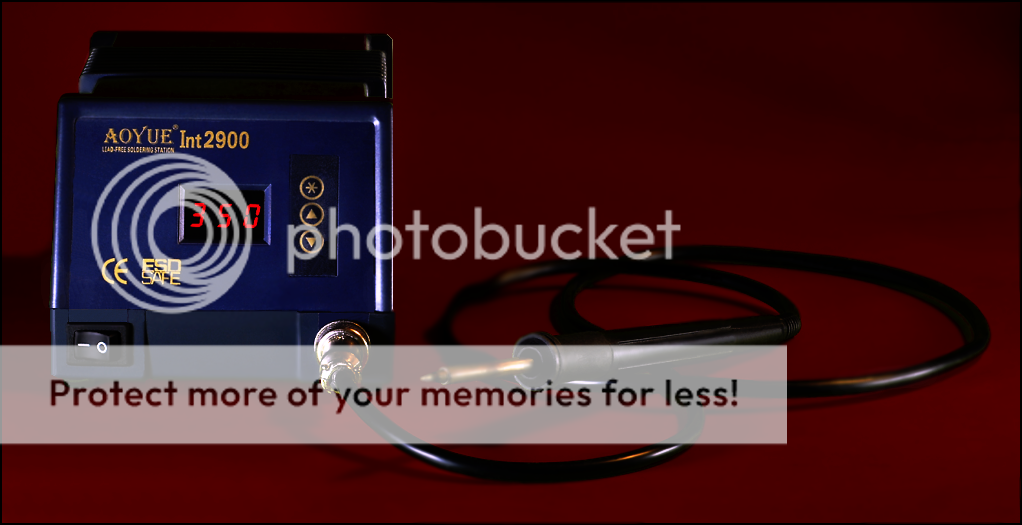
My AOYUE Int2900, Soldering Station, Variable Temperature, 70W - Digital