Showing posts with label Photo-editing. Show all posts

Friday, November 04, 2016

Kalanchoe Revisited

Sometimes we need to look again ...

Kalanchoe Flower
Original Edit: Distracting, unopened bud needs attention.

Kalanchoe Flower
New edit: Background, added Gaussian Blur (+2) with a slight colour balance adjustment
and a little digital noise removed.


Wednesday, February 10, 2016

Smoking DIY: Add Smoke to Any Image

Trick: Add a Smoke Image (ideal, dark background w/ light coloured smoke) into own Layer then set it's "Blend Mode" to "Screen".
 
Bada-bing, bada-boom! 
... There is the (simulated) Blue-smoke-of-death.
   
Paintshop X4 Ultimate Layer
MSH PRÔTOS 500 RC Helicopter Image


For this photo edit Paintshop X4 Ultimate was used.


Tuesday, July 28, 2015

Kalanchoe Flowers

Great subject for photography. 
Nikon D90 w/ AF-S MICRO Nikkor 105mm 1:2.8G ED, Paintshop Pro X4 Ultimate.

My Kalanchoe (WiKi) plant and it's new flowers ...

Kalanchoe Flowers. Nikon D90 w/ AF-S MICRO Nikkor 105mm 1:2.8G ED Photo-edited using Paintshop Pro X4 Ultimate.


Kalanchoe Flowers MACRO. Nikon D90 w/ AF-S MICRO Nikkor 105mm 1:2.8G ED Photo-edited using Paintshop Pro X4 Ultimate.


Monday, February 09, 2015

Inside a Customized ALIGN Trex 450 RC Helicopter

ALIGN Trex 450 (customized) RC Helicopter
Helicopter's canopy see-through look edited within 'Paintshop Pro X4' photo-editor
... Larger View in browser

   
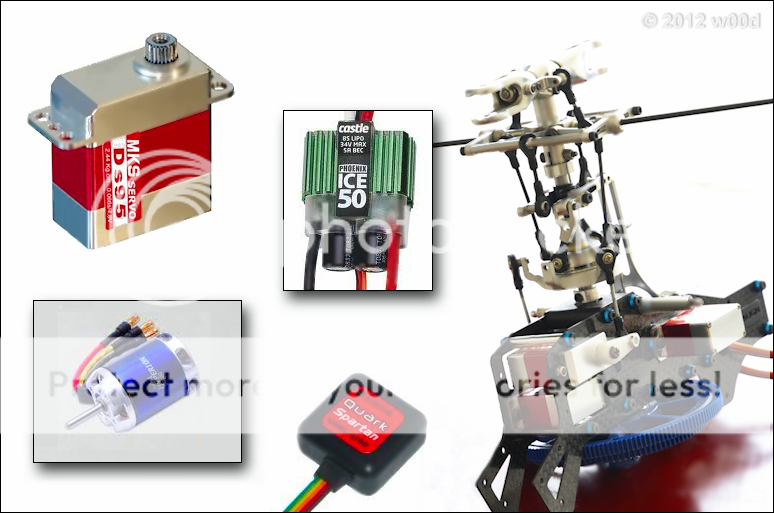
Inside this RC Helicopter, Three Cyclic Servos, ESC Speed Controller,
Drive Motor and the Tail Servo with GYRO. Not shown in this graphic
is it's LIPO battery, 35C 2200mAh 3S 11.1v


Tuesday, January 13, 2015

Saturday, December 13, 2014

The Coloured 74-Oldsmobile Omega

Timelapse Restoration and Colorization,
Jammie Rogers, Daredevil 1917

Published on Oct 13, 2014 ~ c.1917, Washington DC, USA by Harris & Ewing, 5x7 glass plate negative, colour by Jordan J. Lloyd, 2014. Courtesy of the Library of Congress

"Jug ‘Jammie’ Reynolds, also known as ‘The Human Fly’ balances precariously over the edge of the Lansburgh furniture building on 9th NW, Washington DC, 1917 as part of a wider routine including acrobatics. Reynolds toured his daredevil act across the USA, and began his routine by climbing up the building like Spider Man before his acrobatic and balancing displays. Whilst the date of this particular image is dated around 1917, a similar showcase in Carlisle, PA in October 1915 drew a crowd of 1,500 people. The local paper covered the stunt, Reynolds “starting at the awning and landing on the high tower… after reaching it successfully, he placed two tables and on them several chairs,” the article reads. “Then he balanced himself on a chair while people held their breath.”

The restoration ~ more information at Youtube


The video was my inspiration ...
 
Coloured Black & White image of the 1974 - Oldsmobile Omega
Coloured Black & White


Original Black & White image of the 1974 - Oldsmobile Omega
Original Black & White image of my best friends 1974 - Oldsmobile Omega (1976)


Monday, September 29, 2014

Creating a Panorama with Any Camera

With many new features one feature added to the new and popular iOS 8 (iPhone, iPod, iPad variants) camera application is it's new panorama function. This news has many upgrading to iOS 8  excited as it now make's it easier for them to create a panorama image. 
 
Although I am sure that is great news for iOS 8, also many cameras from the humble Point & Shoot and all the way up to the best DSLR now offer panorama but "How would I create a panorama if my camera does not have the function?" According to Luminous Landscape the answer to that question is "Easier Than You Think."

However not to be dismissive and as complete or comprehensive as
Luminous Landscape's tutorial is I used a FREE Windows PC application called Hugin - Panorama photo stitcher to create the images shown below. 

Presented within the Luminous Landscapes tutorial are various methods for creating a panorama but mostly uses  Photoshop.  Of course the method you choose to make yours is entirely up to you.

To learn how ...


Sample output
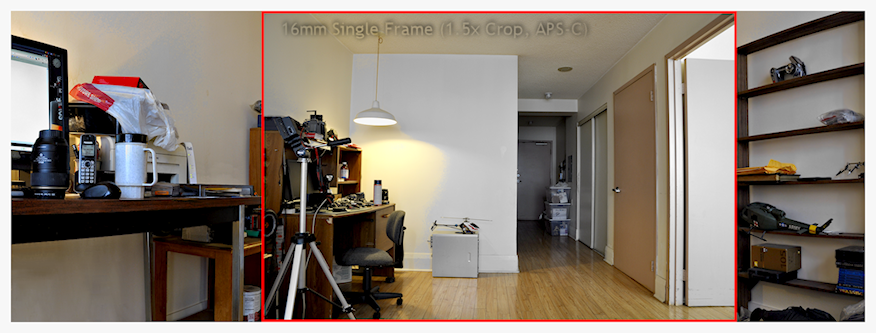
Panorama, single frame shown in RED
16mm DX (APS-C) lens, single frame shown in RED


Panorama Image
Sample output created using Hugin 
View in Browser


Panorama Image
View in Browser  


post-processing fun with my Panorama
Post-processing FUN


Update:
 

Video ~ How-to make a Panorama


Saturday, September 13, 2014

Photo Editing Contest that Wasn't

Awhile back a contest was offered at SLR Lounge  but had long since closed with their chosen winner. However still being interested and up to a challenge on an otherwise boring Saturday I thought I would try editing their image anyway, if only for the FUN of photo-editing and Why the Hell NOT!

The Rules of Engagement, were simple enough "Edit [raw image file] to your liking"
  • Contest: Show Us Your Best Edit And Win
  • Original Image, Nikon RAW (.nef): © Dave Kai Piper
  • Photo Edits (PNG): ©2014 w00d's Photo Muse, The Muse, w00d or pwoodyp
  • Disclaimer: As stated previously I missed entering this contest therefor I decided to challenge myself by doing the suggested editing regardless.
       
 
Original Image, Nikon RAW (.nef): © Dave Kai Piper
ORIGINAL RAW (.nef) file © Dave Kai Piper, resized
and converted to PNG image file for the WEB


The Edits: 
  • Going mostly for subtly or "less is more" following shows what developed.
  • My favorite would be the 'Black & White' with 'Blue Hue' second.

Click image to view larger then Be FREE and Critique.

Black & White: Image Edits © 2014 w00d or pwoodyp
Black & White
Adding Stars: Image Edits © 2014 w00d or pwoodyp
Stars and Trees
Life is Best with a Little Green, YES? Image Edits © 2014 w00d or pwoodyp
Green Hue

Feeding the Blues: Image Edits © 2014 w00d or pwoodyp
Blue Hue


Thursday, August 21, 2014

Black & White Focus Stacked Image

For my macro (WiKi) photography and because of the limited depth of field (what is in focus) usually associated with macro images I need an application that will extend said field of focus. 

Therefor I am currently testing a commercial package, two applications, Helicon Focus and Helicon Remote from HeliSoft. Together this software will allow for focus stacking (WiKi) and tethered camera control. Where Helicon Remote will automate the gathering of all the images (shot at varying focus points) needed for Helicon Focus to do it's focus stacking. 

Software:
Test result:
  • Camera: Nikon D90
  • Lens Focal Length: 105mm (Full-frame or 35mm equiv: 158mm)
  • Image Stack: 9 images and each with a manual exposure of 0.5 sec, f/5.6, ISO 200
  • Image: Black and White, Sony Cyber-shot DSC-H9.png  
     
Test Result : Sony Cyber-shot DSC-H9.png


Tuesday, April 01, 2014

Setting Sun: Fun with the Photo-editor

I wanted to share a quick and easy tutorial I discovered. This lesson would be easy enough
for anyone to master therefor it's perfect for beginners including myself.

Tutorial: 
The Look:

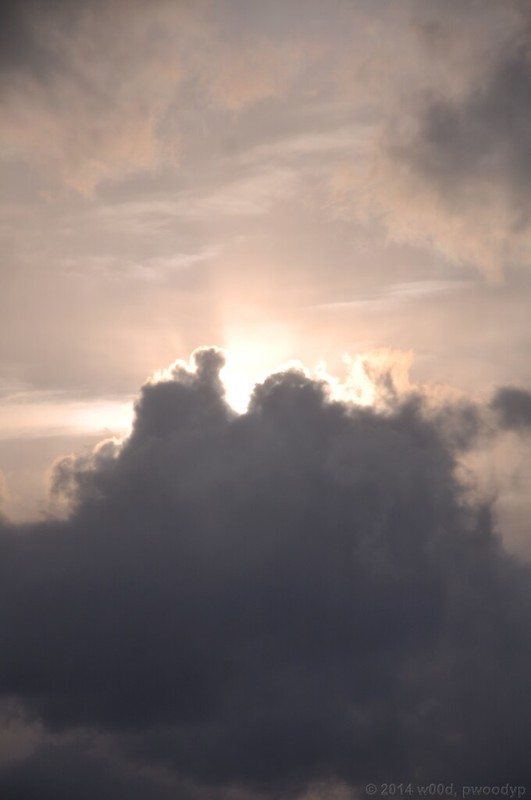
BEFORE ~ A Quick and Simple Technique for Adding Textures to Images ~
Before © 2014 w00d, pwoodyp
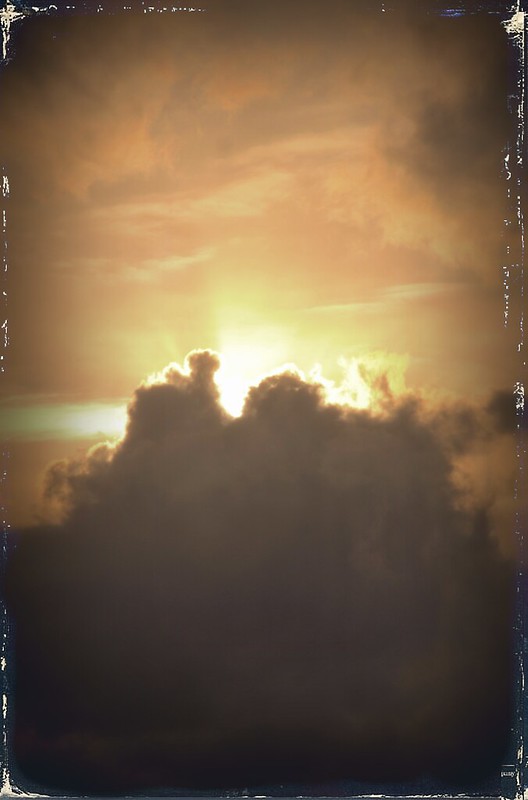
AFTER ~ A Quick and Simple Technique for Adding Textures to Images ~
After © 2014 w00d, pwoodyp

"Your camera takes really nice pictures"
     "Thanks I taught it every thing it knows"
          "Be Free and Critique?"