Showing posts with label Software. Show all posts

Sunday, July 02, 2017

From XP to Windows 10, Finally!

After sitting on the fence for near (WOW) 16 years happy with my copy of Windows XP Professional as I had NO interest in WinXP Pro x64, Win Vista, Win 7, Win 8 and Win 8.1 I finally drank the Kool-Aid as they say by upgrading my computers Operating System to Windows 10 32bit ...

Image: Win10.Desk.png


Monday, September 29, 2014

Creating a Panorama with Any Camera

With many new features one feature added to the new and popular iOS 8 (iPhone, iPod, iPad variants) camera application is it's new panorama function. This news has many upgrading to iOS 8  excited as it now make's it easier for them to create a panorama image. 
 
Although I am sure that is great news for iOS 8, also many cameras from the humble Point & Shoot and all the way up to the best DSLR now offer panorama but "How would I create a panorama if my camera does not have the function?" According to Luminous Landscape the answer to that question is "Easier Than You Think."

However not to be dismissive and as complete or comprehensive as
Luminous Landscape's tutorial is I used a FREE Windows PC application called Hugin - Panorama photo stitcher to create the images shown below. 

Presented within the Luminous Landscapes tutorial are various methods for creating a panorama but mostly uses  Photoshop.  Of course the method you choose to make yours is entirely up to you.

To learn how ...


Sample output
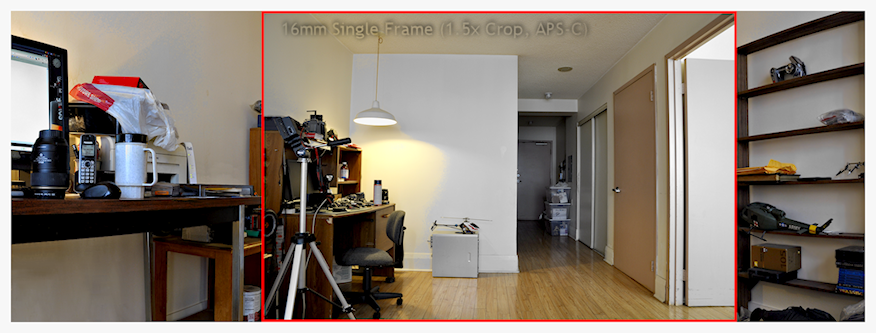
Panorama, single frame shown in RED
16mm DX (APS-C) lens, single frame shown in RED


Panorama Image
Sample output created using Hugin 
View in Browser


Panorama Image
View in Browser  


post-processing fun with my Panorama
Post-processing FUN


Update:
 

Video ~ How-to make a Panorama


Thursday, August 21, 2014

Black & White Focus Stacked Image

For my macro (WiKi) photography and because of the limited depth of field (what is in focus) usually associated with macro images I need an application that will extend said field of focus. 

Therefor I am currently testing a commercial package, two applications, Helicon Focus and Helicon Remote from HeliSoft. Together this software will allow for focus stacking (WiKi) and tethered camera control. Where Helicon Remote will automate the gathering of all the images (shot at varying focus points) needed for Helicon Focus to do it's focus stacking. 

Software:
Test result:
  • Camera: Nikon D90
  • Lens Focal Length: 105mm (Full-frame or 35mm equiv: 158mm)
  • Image Stack: 9 images and each with a manual exposure of 0.5 sec, f/5.6, ISO 200
  • Image: Black and White, Sony Cyber-shot DSC-H9.png  
     
Test Result : Sony Cyber-shot DSC-H9.png


Tuesday, September 25, 2012

The Old Linux Box

I was reminiscing of a day now long gone and if my memory serves the first year my Linux, HTML Server went into operation was late in 1998. For myself 'Linux' was not a new adventure as I was working for IBM here in Toronto building systems (Windows, IBM's own OS2 and Unix platforms) to support of their software development teams.

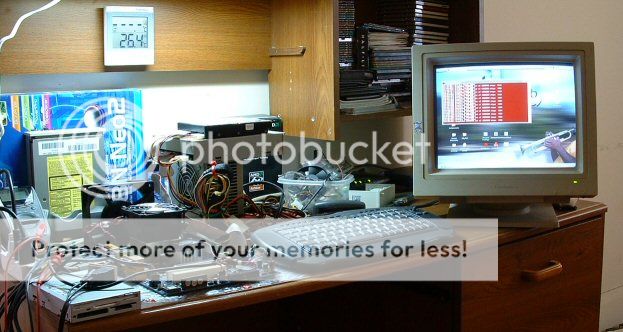
However the following photos were taken just after the introduction of Windows XP. To quote WiKi Windows XP, the successor to Windows 2000 and Windows Me was introduced to  manufactures on August 24, 2001 but wasn't released to the general public until October 25, 2001

The Setup: All the parts used for this server we're gleaned out of a pile of obsolete hardware, old hardware and I needed to setup the hardware and software. 


Just for fun I also wanted to test this system's overclocking potential. As this was a relatively low power machine made from old disused parts I found she 'overclocked' reasonably well and was found a suitable 'Gaming' platform. Given this system would never be used for 'Gaming' also ignoring the fact I didn't have a high performance Video Card needed for 3D intensive applications.


Finished: After the 'Trial and Error' period of the Hardware and Software setup came the following BOX which was also the reason why the machine is exposed and naked as shown above.

This will be the BOX:
... that made my LINUX machine look all nice'n pretty for the wife.

History as it was in those days was a time when the majority of Brand Name PC's could only be bought in one colour, the boring colour well known has beige. Therefor buying a Custom Case was the order of the day as 'beige' would never look good sitting in my (the wife's) living room. 

Yes it was in the interest of the Do-it-Yourself (DIY) crowd of the time to make our computers look better, personally distinctive or simply unique verses anything that could be bought from a retail outlet. Or at least anything but the 'FUGLY' beige of the AGE. If I'm remembering it correctly the only alternative to the 'beige' option in a Brand Name system as 'Home Theater' systems we're just coming of age was the all 'BLACK' system packages offered by companies such has IBM, Hewlett-Packard.

Then came the end of an era! Since the glory days of DIY Computer Modifications, PC manufactures and with their marketing shysters had caught on to the potential market or market niche offered by the DIY scene. Thus since everybody and their uncles mum have started building their own distinctive cases for use in our (our wife's) living room it effectively put an END customizing our own boxes, well almost.

Actually DIY Computer modification still lives on as we only have to search the NET for proof. Customizing my own PC will always be the one and only (true) path to personal distinctiveness or uniqueness! Well it's the age of the Internet where setting oneself above the rest is what it's ALL about, ain't it ...


My HTML serve running a dual-boot Red Hat Linux and WinXP for the Operating Systems, Apache Web Server and PHP the Server-side HTML embedded scripting language.