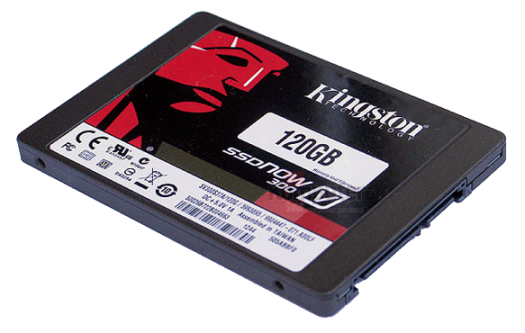
The KIT contained all the necessary connections, a USB External Drive Enclosure to help clone a notebook and came bundled with a lite version of Acronis True Image HD (video) cloning software on bootable CD. Thus resizing the new drives partitions, making it bootable then copying the data off my old drive was done automatically, resulting setup was easy as pie. I was expecting a more involved setup procedure but to my surprise, I was up and running in less than an hour. For the advanced or power users, options for an SSD customization and configuration are available. Although a number of functions such as incremental backups were disabled in the "lite" version I soon discovered the software's limitations was never an issue.

However, all was not perfect in the Happy Land of w00d. According to many reviewers, the drives tested with somewhat of an average speed although selling for a good or a better than average price. I paid $99CAD before taxes and shipping were added. Apparently, all V300s were optimized for price over speed and were given a lower than average MTBF therefore, I think compromises should and can be expected.
Additionally, Kingston and their V300s managed to draw a little controversy when they quietly switched to slower NAND (memory) after many review sites had given the early drives a number of favorable reviews. This news came to light when early purchasers were reporting (via the forums) lower performance than reported by the reviewers. For the details on this story, "Update to Kingston SSDNow V300: A Switch to Slower Micron NAND".
With the 120GB V300 being my first SSDrive and given a recent Graphics Card (ZOTAC Geforce GTX 760 review) or GPU upgrade my 'Toaster' has never been faster. They were not kidding when they say "an SSDrive upgrade is the best bang for your buck".
My old hard disk served me well over the years although it was long overdue for replacement. The drive was a 10-year-old 35Gb IDE HDD which ironically was installed because two modern at the time 100GB SATA drives prematurely and unceremoniously gave up their lives within a few weeks of purchase. Therefore with my new SSDrive not only did I get a boost in data throughput but I also gained additional storage with the peace of mind that only comes with brand new hardware.
When talking about the old drive I think I should mention the difference in noise levels between the two drives. Obviously, the new V300 produces absolutely zero noise whereas my old 35Gb is a little screamer. In the defense of old boy it ran flawlessly for many years and is still running as a second drive but it is showing its age with excessive noise, it's loud!
In my opinion, the prices of SSDrives are starting to look very attractive therefore the time was right for me to buy. With that said as far as the V300s are concerned if one is a power user and if it is raw power and speed one needs (say for gaming or video editing) then I would look at buying something faster. Again, if cost or low cost is your priority then given the low prices of the V300s I think would make them a very good choice for anyone who is building a low budget system.
In closing the gains I saw were indeed impressive if only because my Toaster was so damn-darned-old-and-slow any upgrade that could guarantee an increase in system speed would be readily apparent. Nevertheless, the "best bang for my buck" for a system speed boost I hit on the top two with the new SSDrive and faster Graphics Card! Next on my hit-list would be a new motherboard, improved memory with a blazingly-fast-kick-arse CPU ...
However, all was not perfect in the Happy Land of w00d. According to many reviewers, the drives tested with somewhat of an average speed although selling for a good or a better than average price. I paid $99CAD before taxes and shipping were added. Apparently, all V300s were optimized for price over speed and were given a lower than average MTBF therefore, I think compromises should and can be expected.
Additionally, Kingston and their V300s managed to draw a little controversy when they quietly switched to slower NAND (memory) after many review sites had given the early drives a number of favorable reviews. This news came to light when early purchasers were reporting (via the forums) lower performance than reported by the reviewers. For the details on this story, "Update to Kingston SSDNow V300: A Switch to Slower Micron NAND".
My Toaster has Never Been Faster
 |
| ZOTAC Geforce GTX 760 Review |
My old hard disk served me well over the years although it was long overdue for replacement. The drive was a 10-year-old 35Gb IDE HDD which ironically was installed because two modern at the time 100GB SATA drives prematurely and unceremoniously gave up their lives within a few weeks of purchase. Therefore with my new SSDrive not only did I get a boost in data throughput but I also gained additional storage with the peace of mind that only comes with brand new hardware.
When talking about the old drive I think I should mention the difference in noise levels between the two drives. Obviously, the new V300 produces absolutely zero noise whereas my old 35Gb is a little screamer. In the defense of old boy it ran flawlessly for many years and is still running as a second drive but it is showing its age with excessive noise, it's loud!
Would I Recommend Kingston's SSDNow V300?
In my opinion, the prices of SSDrives are starting to look very attractive therefore the time was right for me to buy. With that said as far as the V300s are concerned if one is a power user and if it is raw power and speed one needs (say for gaming or video editing) then I would look at buying something faster. Again, if cost or low cost is your priority then given the low prices of the V300s I think would make them a very good choice for anyone who is building a low budget system.
Yes, I am more than happy with my choice.
In closing the gains I saw were indeed impressive if only because my Toaster was so damn-darned-old-and-slow any upgrade that could guarantee an increase in system speed would be readily apparent. Nevertheless, the "best bang for my buck" for a system speed boost I hit on the top two with the new SSDrive and faster Graphics Card! Next on my hit-list would be a new motherboard, improved memory with a blazingly-fast-kick-arse CPU ...
Kingston Technology ~ home
SSD vs HDD: Must be taken with the proverbial "grain of salt" ... of course actual mileage will vary.
- SSDNow V300 product page
- SSD vs HDD
- Installing the Hardware
- Transferring DATA
- SSDs In Use
FYI:
- Five Inexpensive Upgrades To Boost a PC's performance:
"Beyond the RAM, probably the biggest thing you can do to speed up any older system is to switch out the old HDD for a new super fast SSD" - Memory upgrade, how to make your PC faster:
"Upgrading your RAM can help performance, but it depends on your machine" - CPU/GPU Overclocking: "Google is your friend"